AI agents
An AI agent or a script needs secrets, but it should not get your master password or a key that opens everything. Lasbolt gives agents limited access, and it keeps secret values out of the agent’s context.
The tools
| Tool | Use it for | Lasts |
|---|---|---|
Session (lasbolt login) | An agent that runs on your machine while you are there | 24 hours, 1 hour access tokens that renew |
Scoped key (lasbolt keys create) | CI jobs and agents that run alone | Until its expiry |
References (lasbolt://...) | Name a secret without its value | n/a |
lasbolt run and lasbolt inject | Give a secret to a program, not to the agent | One run |
| Per-use approval | A secret that needs your yes each time | One use |
MCP server (lasbolt mcp) | Agents that speak the Model Context Protocol | One process |
References
A reference names a secret: lasbolt://<space>/<folder>/<item>/<field>. A plain path such as Personal/Web/example-site/password works too. The reference lasbolt://id/<item ID>/<field> stays valid when you rename things. A metadata key has the form meta.<key>. If two items match, you get the error ambiguous_ref with the candidates.
Give a secret to a program
lasbolt run starts a program and puts the values in its environment. The agent that starts it never sees the value.
lasbolt run --env API_TOKEN=lasbolt://Personal/Web/example-site/password -- ./deploy.shlasbolt run hides each injected value in the output of the program. It also hides the base64 and the URL-encoded forms. This is a help against accidents. It is not a security boundary: a program that you start can encode the value in other ways.
lasbolt inject fills {{ lasbolt://... }} in a template:
printf 'user: {{ lasbolt://Personal/Web/example-site/username }}\n' | lasbolt injectuser: annaSessions for an agent
Start a login with limited access. The command that you give to an agent must not wait for a person. Use --json: it prints the approval address as data and waits.
lasbolt login --json --access read --meta http://127.0.0.1:8080{"code":"QWPC-NSBZ","expires_in":599,"fingerprint":"124B 71D2 DFA6 604F","status":"auth_required","url":"http://127.0.0.1:8080/approve?code=QWPC-NSBZ"}The agent shows url and code to you. You open the page, compare the code, and approve. See Devices and approvals.
| Flag | Effect |
|---|---|
--access read | The default. Read only. Also write and admin. |
--meta | Names and metadata only. No secret values. |
--no-browser | Print the address. Do not open a browser. |
Scoped keys for CI and unattended agents
A scoped key has a name, an access level, a scope, an expiry and an optional IP range. It is its own principal. It has its own keys. The server stores only a hash of its secret.
You make a key with the CLI. You must be logged in with the master password, or with an admin session that holds your user keys. You can also make a key on Settings > Keys in the web app.
lasbolt keys create ci-deploy --access read --folder Personal/Web --expires 30dlasbolt_sk_702cc4884fa9bd6156e78c9a6fc7fe6b_e1b0ee43...
lasbolt: key "ci-deploy" made (ID 702cc4884fa9bd6156e78c9a6fc7fe6b, fingerprint 0DDE 91EC D360 3B19). The line above is the only copy: it is shown once and is not stored.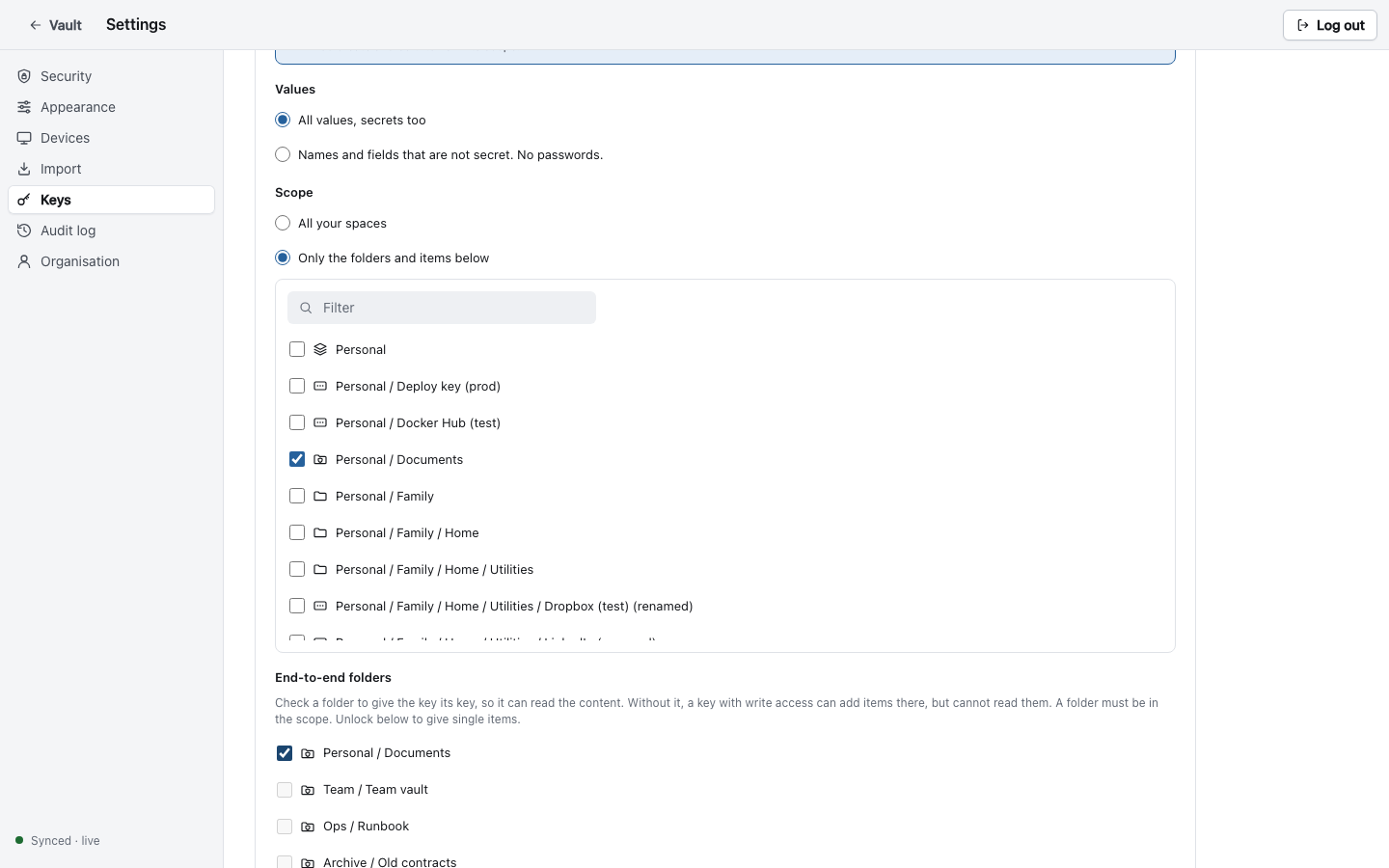
| Flag | Effect |
|---|---|
--access read|write | Default read. |
--values all|meta | meta gives names and metadata, no secret values. |
--folder REF, --item REF | Limit the key to a space, folder or item. Repeat for more. |
--e2e-grant REF | Give the key the key of an end-to-end folder or item. Without it, a key with write access can add items there, but it cannot read them. |
--expires DURATION | 30d, 12h or a date. At most 5 years. |
--ip CIDR | Accept the key from this address range only. Repeat for more. |
Use the key in a CI job with two environment variables. Nothing is written to disk:
export LASBOLT_SERVER=https://lasbolt.example.org
export LASBOLT_KEY=lasbolt_sk_...   # from the secret store of your CI
lasbolt run --env DB_PASSWORD=lasbolt://Personal/Web/example-site/password -- ./migrate.sh
Manage keys with lasbolt keys list and lasbolt keys revoke <id>.
Per-use approval
Mark a secret so that every read by a session or a scoped key needs your yes. In the web app, turn on Ask me before an agent or CLI session reads a secret in the item form. On the CLI:
lasbolt edit Personal/Web/example-site --approve each-use
lasbolt edit Personal/Web/example-site --approve off
When an agent reads the secret, the command waits:
Waiting for approval in the Lasbolt web app… (approval ID 6c6db979...)You see a prompt in your open web app with the name of the agent, the item, the field and the purpose. After you approve, the agent gets the value once, within 5 minutes. The CLI waits 2 minutes by default (--approval-timeout). Then it stops with exit code 7.
Limits you must know:
- A password login of yours (a device token) is not asked.
- The prompt reaches only an open web app. A person who approves without reading it gives the value away.
- For server-readable items, the server keeps the value back. For E2E items, the check is a boundary only for a principal that does not hold the item key.
The MCP server
lasbolt mcp is an MCP server on stdio. Its tools are status, search, describe, run and login. No tool returns a secret value. The run tool runs a command with references in its environment, as lasbolt run does. See MCP tools.
Add it to an agent. This is a .mcp.json file for Claude Code:
{
  "mcpServers": {
    "lasbolt": {
      "command": "lasbolt",
      "args": ["mcp", "--purpose", "coding agent"],
      "env": {
        "LASBOLT_SERVER": "https://lasbolt.example.org"
      }
    }
  }
}
Without a key in the file, the server uses the login that you made with lasbolt login. If the login ended, a tool returns login_required with an address and a code. The agent shows them to you, you approve, and the agent calls the tool again.
For an agent that runs alone, add the scoped key to env as LASBOLT_KEY. The file then holds a secret: make it readable only by you, and do not put it in a repository.
claude mcp add lasbolt --env LASBOLT_SERVER=https://lasbolt.example.org -- lasbolt mcpThe MCP server marks names, notes, metadata and program output as untrusted data from other principals. An agent can still be tricked by text in them. Use a key with --values meta and per-use approval for secrets that matter.
Give the agent a rule
Tell the agent how to use secrets. For example, in the instruction file of your project:
Never print or read secret values. Use references of the form
lasbolt://<space>/<folder>/<item>/<field> with the `run` tool of the lasbolt MCP
server. If a tool says login_required, show me the address and the code.
Exit codes and errors
The CLI uses stable exit codes. The most important for agents: 3 login required, 4 outside scope, 7 approval denied or timed out, 9 locked. A --json error has the fields code and message, and login_url where it applies. See Exit codes and Agent ops.
Audit
Every login, approval and server-side read of a secret is logged with the principal, the device and the --purpose text. Look in Settings > Audit log to see what an agent read this week. Values never appear in the log.