Browser extensions
The Lasbolt extension fills logins in your desktop browser. It has no vault of its own and does not talk to your server. It talks to the local agent of lasbolt through a native messaging host. So you sign in once with the command line or the macOS app, and the extension uses that sign-in.
What it does
- It fills the username and password of the login that matches the page. It fills only after you act: a click in the popup, the shortcut, or a pick in the inline menu. A page load never fills.
- It shows the one-time code of an item, and copies values. The background clears the clipboard after 30 seconds.
- It does not save new logins. Save a login in the macOS app, the Android app, the web app or with
lasbolt new. - It cannot write to your vault, and it cannot show a secret to a page.
Which browsers
| Browser | System | How |
|---|---|---|
| Chrome | macOS, Linux | Load the unpacked folder, then lasbolt integrate chrome |
| Firefox | macOS, Linux | Load as a temporary add-on, then lasbolt integrate firefox |
| Safari | macOS | Comes with the macOS app |
| Edge, Brave and other browsers on Chromium | Not supported yet | |
| Any browser | Windows | Not supported yet |
| Browsers on Android and iOS | No extension. Use the Android autofill or the iOS AutoFill. |
Install
You need Go and make. See Build and test.
Build and install lasbolt
make install-cliThis puts lasbolt in ~/.local/bin. The host manifest points to this file, so do not move it later.
Sign in
lasbolt login https://vault.example.org
lasbolt unlock
unlock opens the E2E folders. Without it, the extension does not list their logins. See Command line.
Build the extension
make extensionThe command writes dist/extension-chrome/, dist/extension-firefox/ and dist/extension-safari/.
Load it
Open
chrome://extensions.Turn on “Developer mode”.
Click “Load unpacked” and choose
dist/extension-chrome/.Connect the host. The development build has a fixed ID:
lasbolt integrate chrome --extension-id ecmceepigijchocdejjbigpdcjhbaekmRestart Chrome.
To check what integrate writes before it writes, add --dry-run. To remove the host manifest, add --uninstall. The macOS app can do both for Chrome and Firefox in Settings, in the Browsers tab.
Fill a login
Click the Lasbolt icon in the toolbar. The popup lists the logins for the site in the tab. Use “Fill”, “Copy username” or “Copy password”. An item with a TOTP key has a “Code” button.
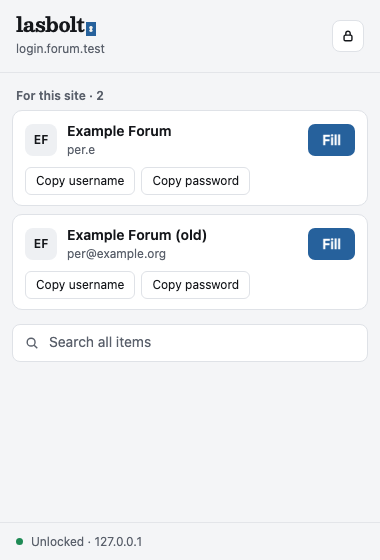
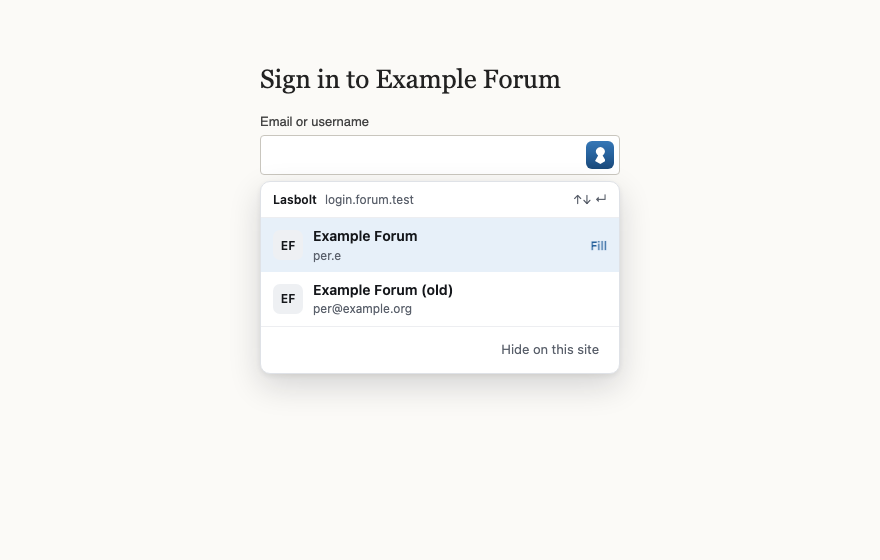
The search field in the popup finds all items. A search result can copy the username only. To fill or to copy a password, the URL of the item must fit the site in the tab.
How a match works
A login matches when the page uses https (or http on localhost and 127.0.0.1) and the item has a URL with the same registered domain. A look-alike host gets no match. A form in an iframe from another origin is never filled.
Items that ask first
An item can ask for approval before each use. The popup then shows a wait state. Approve the request in the web app. The extension fills after you approve. See Devices and approvals.
Settings
Open the options page of the extension. It has one switch, “Show the Lasbolt icon in login fields”. It also lists the sites where you hid the icon with “Hide on this site”. Use the list to show the icon again.
Problems
| The popup says | Do this |
|---|---|
| Lasbolt is not set up for this browser | Run lasbolt integrate, then restart the browser |
| The Lasbolt agent does not answer | Run lasbolt agent status |
| Not logged in | Run lasbolt login <server URL> |
| Lasbolt is locked | Run lasbolt unlock |
| The encrypted folders are locked | Run lasbolt unlock. Their logins show after that. |
The popup has a Lock button. It drops the E2E keys from the agent.
Security
The extension gets only names, usernames and URLs until you pick an item. Then the agent checks the URL again and gives the values for that site only. A web page cannot send a message to the extension. See the threat model.