Recovery
If you forget your master password, Lasbolt cannot bring it back. The server never has it. The recovery kit is your way back in. Make one before you need it.
What you can lose
| Situation | Server-readable data | End-to-end (E2E) data |
|---|---|---|
| You have the master password | Safe | Safe |
| You forgot it, and you have the recovery kit | Safe | Safe |
| You forgot it, and you have no kit, but the operator resets your account | Safe | Locked for ever |
| You forgot it, and you have no kit, and the operator does not help | No access | Lost |
Make a recovery kit
Open the page
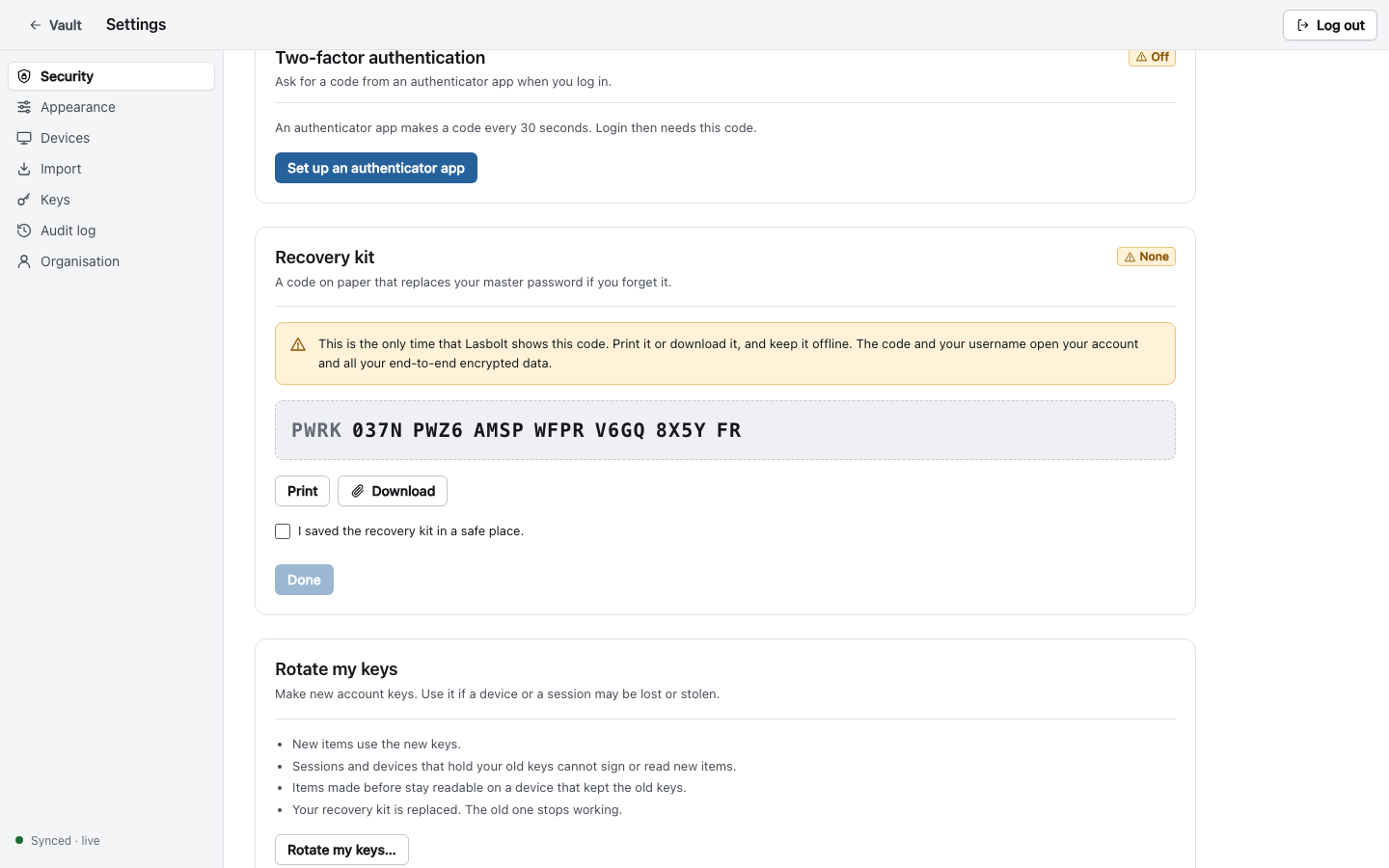
Unlock E2E in the web app. Go to Settings > Security > Recovery kit. Make the kit.
Save the code
The page shows a code once. It looks like PWRK-XXXX-XXXX-XXXX-XXXX-XXXX-XXXX-XX. It has 26 characters and 130 random bits. Click Print or Download. Keep the paper or the file offline, in a safe place.
Confirm
Tick I saved the recovery kit in a safe place, and click Done.
A new kit replaces the old one. The old code stops working. The audit log records “recovery kit made”.
Recover your account
Use this when you forgot the master password. You need your username and the recovery code.
- On the login page, click Forgot your master password?
- Enter your username and the recovery code. A wrong format is refused before any request. You can type the code with or without dashes and spaces.
- Enter a new master password twice.
- Save the new recovery kit that the page shows. The code you used is now used up.
A recovery:
- Ends all web sessions and all device logins. You sign in again everywhere.
- Keeps scoped keys and device-code sessions, because they have their own keys.
- Keeps two-factor authentication as it was. The same authenticator app works.
- Uses up the kit. You get a new one at once.
Ask the operator to reset your account
If you have no kit, the operator of the server can reset your account. The operator runs this on the server host:
lasboltd user reset-password <username> --url https://<your server>It prints a link. The link works once, for one hour. Open it, read the warning, and set a new master password.
After a reset, make a new recovery kit. The audit log shows “password reset by the operator”. If you did not ask for a reset, tell the operator.
What the operator can and cannot do
| The operator can | The operator cannot |
|---|---|
| Make a reset link for you | See your master password or your recovery code |
| Read your server-readable data (they run the server) | Read your E2E data without your keys |
| Disable your account | Open E2E data of old keys after a reset |
| Restore a backup | Make a recovery code work that you do not have |
An admin role in the web app gives no access to the content of your spaces.
Rotate your keys
If a device or a session that held your keys may be lost or stolen, rotate your account keys. Go to Settings > Security > Rotate my keys. New items use the new keys. Sessions and devices that hold the old keys cannot sign or read new items. Items made before the rotation stay readable to a holder of the old keys. Your recovery kit is replaced, and the old one stops working.
Not available yet
- An organisation recovery key, which lets owners recover the E2E data of members. It is planned and it is off by default. It is not built.
- Reset of access to server-readable data by an admin in the web app. Only the operator reset exists today.